


If you are looking to diversify your retirement portfolio beyond traditional stocks, bonds, and mutual funds, moving a portion of your nest egg into alternative assets like Bitcoin, Ethereum, and physical gold is one of the most compelling strategies available today.
However, transferring retirement funds can feel like navigating a tax minefield. Make one wrong move, and the IRS could treat your transaction as an early distribution—subjecting you to income taxes plus a 10% early withdrawal penalty if you are under age 59½.
In this guide, you will learn exactly how to transfer 401k to iTrustCapital without penalty, the critical difference between a direct and indirect rollover, the pros and cons of self-directed crypto IRAs, and how to execute the transfer seamlessly.
🎁 Limited-Time Bonus: Sign up using our exclusive iTrustCapital link and fund your account with $1,000 or more to claim a $100 funding bonus deposited directly into your new IRA!
What Is iTrustCapital and Why Transfer Your 401(k)?
iTrustCapital is a premier self-directed Crypto IRA platform that enables investors to buy, sell, and trade cryptocurrencies and physical precious metals within a tax-advantaged account (Traditional or Roth IRA).
Key Features of iTrustCapital
- 1% Crypto Transaction Fees: Significantly lower than traditional retail exchanges that charge 1.5% to 4% per trade.
- No Monthly Account Fees: Unlike many self-directed IRA custodians that charge monthly or annual maintenance fees, iTrustCapital charges $0 per month.
- Institutional Security: Assets are secured using institutional-grade custodians such as Coinbase Custody and Fortress Trust, backed by comprehensive insurance policies.
- 24/7 Trading: Execute trades around the clock within your tax-sheltered IRA wrapper.
- $100 Funding Reward: New users who open and fund an account receive a $100 sign-up bonus.
By rolling over an old 401(k) into an iTrustCapital Crypto IRA, you retain the tax benefits of a retirement account—either tax-deferred growth in a Traditional IRA or tax-free growth in a Roth IRA—while gaining exposure to high-upside alternative assets.
Direct vs. Indirect Rollover: The Golden Rule to Avoid Penalties
To transfer your 401(k) funds to iTrustCapital without triggering taxes or penalties, you must understand the distinction between a Direct Rollover and an Indirect Rollover.
Direct Rollover (Recommended)
401(k) Custodian  ───────────>  iTrustCapital Custodian
(Tax-Free & Penalty-Free)

Indirect Rollover (Risky)
401(k) Custodian  ──>  Your Bank Account  ──(60 Days)──>  iTrustCapital
(Subject to 20% Tax Withholding & 60-Day Deadline)
1. Direct Rollover (Trustee-to-Trustee Transfer)
In a Direct Rollover, your current 401(k) plan provider transfers your account funds directly to your new iTrustCapital IRA custodian.
- Tax Impact: $0 taxable event.
- Penalty: No IRS early withdrawal penalty.
- Withholding: No mandatory tax withholding.
- Best Choice: This is the safest, most stress-free method.
2. Indirect Rollover (60-Day Rule)
In an Indirect Rollover, your 401(k) administrator issues a check made payable directly to you. You then have 60 daysfrom the date of receipt to deposit those funds into your new IRA.
- Tax Risk: Your 401(k) provider is required by law to withhold 20% for federal income taxes. To complete a full rollover, you must replace that 20% out of your own pocket when funding your IRA.
- Penalty Risk: If you fail to deposit the full amount within 60 days, the IRS treats the unrolled portion as a distribution, triggering income tax and a 10% penalty (if under 59½).
- Pro Tip: Always request a Direct Trustee-to-Trustee Transfer to ensure your rollover remains 100% tax-free and penalty-free.
Step-by-Step: How to Transfer 401k to iTrustCapital Without Penalty
Follow this step-by-step walkthrough to successfully transfer your retirement funds.
Step 1: Confirm Your 401(k) Eligibility
Before initiating a transfer, confirm that your 401(k) is eligible for a rollover:
- Former Employer 401(k): If you no longer work for the employer who sponsors the plan, your funds are fully eligible for a penalty-free rollover.
- Current Employer 401(k): Most active plans do not allow “in-service distributions” unless you are over age 59½ or the plan rules explicitly permit it. Check with your plan administrator.
Step 2: Open Your iTrustCapital Account
Creating your account takes under 10 minutes:
- Click this link to open your iTrustCapital account and qualify for the $100 funding bonus.
- Complete the standard Identity Verification (KYC) process.
- Select your desired account type: Traditional IRA (pre-tax) or Roth IRA (after-tax).
(Note: Match your current 401(k) tax structure—Traditional 401(k) to Traditional IRA—to avoid creating a taxable conversion event.)
Step 3: Request Rollover Documents from iTrustCapital
Once your account is approved:
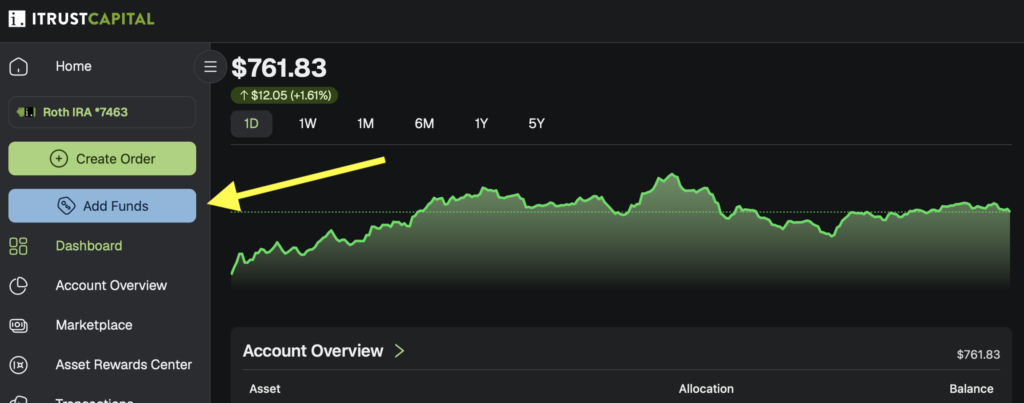
- Navigate to the Fund Account section inside your dashboard.
- Choose Rollover / Transfer as your funding mechanism.
- iTrustCapital will generate a formal Transfer Request Form and provide deposit instructions containing the exact name of their custodian (e.g., Fortress Trust FBO [Your Name] IRA).
Step 4: Contact Your Current 401(k) Administrator
Contact your 401(k) provider (e.g., Fidelity, Vanguard, Schwab, Empower) and inform them that you want to execute a Direct Rollover to an Eligible IRA Custodian.
Provide them with the deposit instructions from iTrustCapital:
- Payee Name: Must be made payable to the custodian for your benefit (e.g., Fortress Trust FBO [Your Name] IRA).
- Mailing Address: The custodian address provided in your iTrustCapital dashboard.
Step 5: Complete the Transfer & Claim Your $100 Bonus
Depending on whether your prior provider issues a wire transfer, ACH, or physical check:
- Electronic Wire / ACH: Funds typically arrive in 2–5 business days.
- Physical Check: The provider mails the check to the custodian (or to you to forward). Once deposited, funds clear in 5–10 business days.
Once your rollover deposit hits your new account (minimum $1,000 deposit), your $100 bonus reward will be automatically processed, and you can start placing 24/7 crypto and precious metal trades inside your tax-sheltered account.
Read More: iTrustCapital vs Bitcoin IRA Fees: Which Crypto IRA Is Actually Cheaper?
Comparison: iTrustCapital vs. Traditional Crypto Exchanges
| Feature | iTrustCapital Crypto IRA | Standard Crypto Exchange (e.g., Coinbase) |
|---|---|---|
| Tax Treatment | Tax-deferred or Tax-free growth | Subject to capital gains tax on every trade |
| Trading Fees | 1% flat transaction fee | 0.6% – 4.0%+ per transaction |
| Monthly Fees | $0/month | $0/month |
| New Account Bonus | $100 Bonus with $1,000+ deposit | Varies ($5 – $20) |
| Funding Source | 401(k), 403(b), IRA Rollovers | Personal Bank / Checking Account |
| IRS Compliance | Fully compliant custodian reporting | Manual tax reporting (Form 8949 / 1099-DA) |
Pros and Cons of Rolling Over to iTrustCapital
Pros
- Tax Efficiency: Trade crypto without triggering a taxable capital gains event on every transaction.
- Low Cost Structure: 1% trade fees with $0 recurring monthly account fees.
- $100 Signup Reward: Receive an extra $100 cash bonus when you fund your account with at least $1,000.
- Diversification: Access major 100+ cryptocurrencies (BTC, ETH, SOL, XRP) + Stocks / ETFs and physical gold/silver in a single interface.
- Institutional Security: Assets stored with qualified institutional custodians.
Cons
- No In-Service Transfers: Harder to transfer funds from an active, current-employer 401(k).
- Self-Key Custody Not Supported: Assets are held by institutional custodians, meaning you cannot withdraw private keys to a hardware wallet.
Common Mistakes to Avoid
- Making the Check Payable to Yourself: Ensure the check is made payable to the custodian (FBO Your Name), not directly to your personal checking account.
- Missing the 60-Day Window (If Indirect): If an indirect check is issued to you, complete the rollover within 60 calendar days to avoid severe tax penalties.
- Mismatched IRA Types: Rolling a Traditional pre-tax 401(k) into a Roth IRA triggers a taxable Roth conversion. Match Traditional to Traditional unless you intend to pay income tax on the converted balance this tax year.
- Forgetting to Use the Promo Link: Signing up directly on the homepage without a referral link misses out on the $100 funding bonus.
Frequently Asked Questions (FAQ)
Will I owe taxes when moving my 401(k) to iTrustCapital?
No. As long as you perform a direct rollover from your 401(k) to a Traditional iTrustCapital IRA, it is a non-taxable event.
How do I get the $100 bonus on iTrustCapital?
To claim the $100 bonus, you must open your account through an official promotional link and fund your account with a minimum deposit of $1,000. The bonus is credited after your funding clears.
Can I transfer an active 401(k) from my current job?
Generally, no. Most employers restrict 401(k) transfers while you are actively employed unless you are age 59½ or older or your specific plan terms allow in-service distributions.
How long does a 401(k) to iTrustCapital transfer take?
The entire process usually takes between 1 to 3 weeks, depending on how quickly your current 401(k) provider processes and mails or wires the funds.
Final Thoughts: Take Control of Your Retirement
Rolling over an old 401(k) into an iTrustCapital account is one of the most effective ways to hedge against inflation and add digital asset exposure to your retirement strategy—all while protecting your wealth from unnecessary tax penalties.
Ready to start diversifying your retirement portfolio and claim your free cash bonus?